A construction safety software feature list should help you decide how the tool fits the work. Start with a condition your team needs to review, then follow the information from the original footage to the person responsible for checking it.
For video and photo safety checks, the useful questions are concrete. What does the tool examine? Does a flag identify the OSHA requirement it relates to? Can the safety team understand the observation and check the actual work? What recording and handling arrangements will workers need explained?
This guide gives you a neutral evaluation checklist, with Osha Ask as an example of AI footage review. This guide is general information, not legal advice.
Define The Safety Task Before Comparing Features
Choose a work area and name the concern. Reviewing PPE during an operation differs from reviewing an edge, a ladder landing or a trench. A defined task makes it easier to judge whether a demonstration provides useful information.
Construction programs must include frequent and regular inspections of jobsites, materials and equipment by designated competent persons. Identify the people carrying out that responsibility and involve them in evaluating the tool. 1926.20(b)(2)
Ask the reviewer what information they need for the decision. The answer may include the location, current activity, surrounding work and the rule behind the concern. Use that list to structure the demonstration.
Ask What The Tool Checks
Look for specific conditions instead of a broad promise to manage every safety issue. Ask for examples of the work areas the tool reviews and the hazards it flags. Have the vendor apply the explanation to a task your team understands.
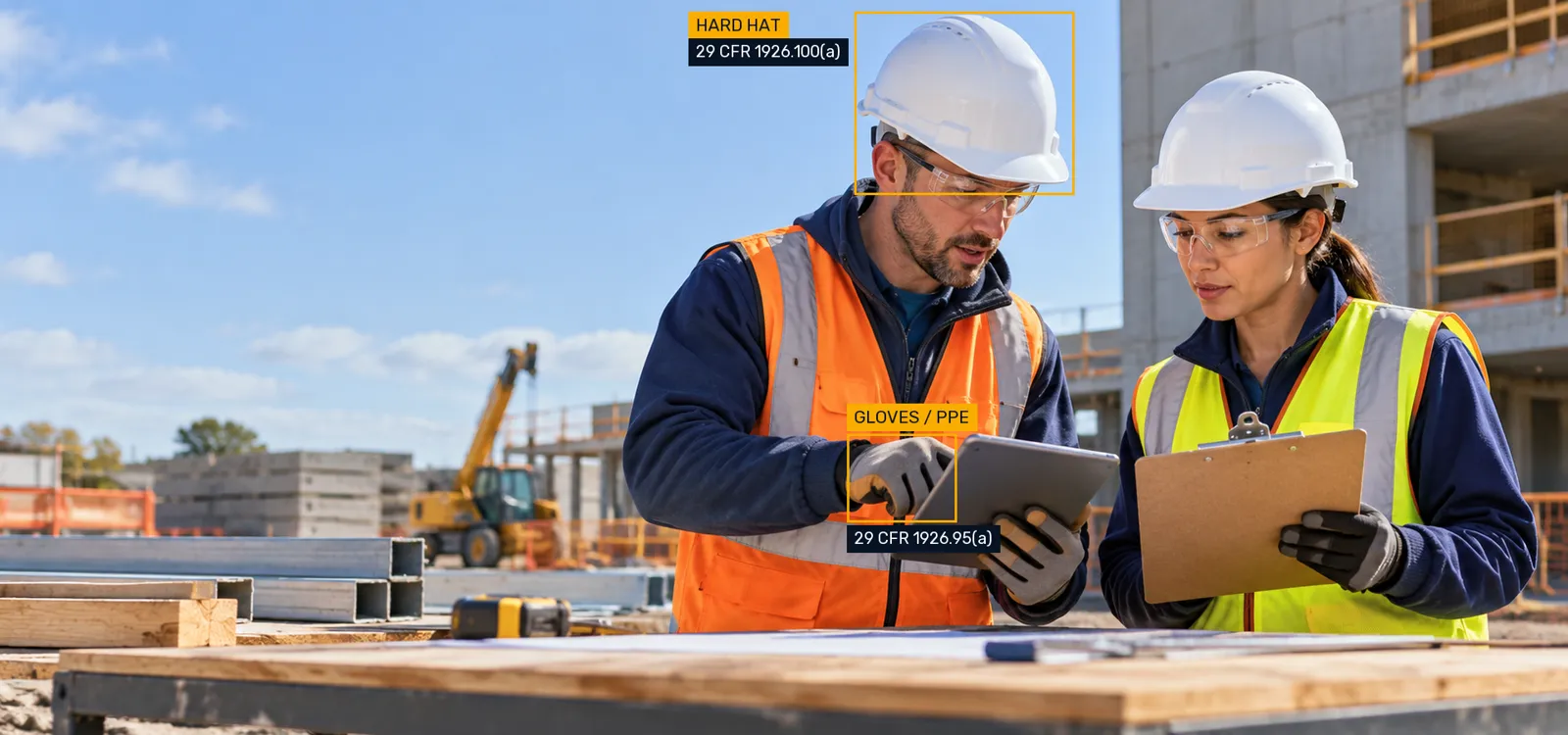
Osha Ask reviews job site video and photos against OSHA requirements and flags hazards and missing safety measures. Its checks address visible conditions involving PPE, fall protection, guardrails, holes, scaffold access, ladders, trenches and housekeeping.
For each example, compare the flag with the source material. Can the reviewer identify the condition? Is enough of the work visible to understand the concern? What additional check will the responsible person need on site?
Look For The OSHA Requirement Behind A Flag
A rule link makes an observation easier to examine. The reviewer can open the provision and assess whether it fits the actual activity and exposure. Ask how the tool identifies the requirement related to a condition and how your team reads it during review.
For example, protective helmets are required where workers face possible head injury from impact, falling or flying objects, or electrical shock and burns. The exposure matters to the decision. 1926.100(a)
An edge review raises a different question. Workers on an unprotected walking or working surface edge six feet or more above a lower level need guardrails, safety nets or a personal fall arrest system. 1926.501(b)(1)
Osha Ask shows the OSHA requirement each flag relates to. Use that connection to examine the observation with the people responsible for the work.
Review Video And Photo Inputs With Your Own Work
Ask how site material reaches the review and what capture arrangements fit your project. Discuss the cameras or devices involved, the kind of footage you want examined and the steps your crew would follow. Establish the operational details before making the process part of ordinary work.
Use representative material in the discussion. Include a clear scene and a view where equipment or materials obscure part of the area. That helps the team identify what the footage can explain and what still needs a direct site check.
A useful example is a passageway that changes during deliveries. Review the original view, the later condition and what the flag identifies. Then ask the responsible person what information they would need to check the route.
Trace How Findings Reach The Safety Team
Follow an observation from review to response. Who examines it first? Who knows the location? Who checks the actual condition? How does the team handle a finding that affects another trade?
Ask the vendor to explain the relevant workflow, and document the site's own responsibilities alongside it. These are evaluation questions; resolve the arrangements for your team before deciding how to use the tool.
The competent-person definition combines hazard-recognition capability with authority to take prompt corrective measures. A software review process needs to reach people who can assess and address the work. 1926.32(f)
Ask Clear Worker Privacy Questions
Discuss what will be recorded, who can review it, where it is handled and how long it is kept. Ask about audio, access controls, retention, deletion and any use of material for AI training. Establish the answers for the actual service and site arrangement.
Explain the safety purpose to crews and give them a way to ask questions about findings or recording practices. OSHA's recommended practices encourage worker participation in operating and improving safety programs. OSHA Worker Participation
Use plain language in the introduction. Workers need to understand how a concern reaches the safety team and how they can explain something the view does not show. Their experience with the task is part of the review.
Use A Feature Evaluation Checklist
| Evaluation Area | Question To Ask |
|---|---|
| Task fit | Which specific site conditions does the tool check? |
| Video and photos | What material can our team use and how is it provided? |
| OSHA rules | Does a finding identify the related requirement? |
| Review clarity | Can our safety lead understand and locate the condition? |
| Responsibility | How will findings reach the person checking the work? |
| Site changes | How does the routine fit trade and supervisor handoffs? |
| Worker communication | How will crews understand the safety purpose? |
| Privacy | What recording, access and handling arrangements apply? |
| Evaluation evidence | What real examples will we review after the demonstration? |
| Commercial discussion | What scope and terms fit the work we want reviewed? |
Record answers in the same structure for each evaluation. Keep product statements distinct from the tasks your team will carry out. A demonstration should make the relationship clear enough that the people using the process can explain it afterward.
Decide What A Useful Result Looks Like
Choose the examples you will review with the team after the demonstration. Look at whether the flag was understandable, whether the related rule was useful and what the on-site reviewer needed to complete the assessment.
Include confusing observations in that discussion. They can show where a view is insufficient, where a task needs better explanation or where the review handoff needs improvement. Use the evidence from your own work to decide the next step.
The AI in construction safety guide explains the program context. Our construction safety compliance guide helps choose a first topic for evaluation.
See Osha Ask Review Your Site Footage
Osha Ask reviews job site video and photos and checks what it sees against OSHA requirements. It flags hazards and missing safety measures so your safety team can act on them sooner. Each flag shows the related OSHA rule.
AI helps your safety team see more; your people still make the call.
Explore OSHA compliance software and AI video safety monitoring. Ask us about pricing when you book a demo.
Osha Ask is an independent software product and is not affiliated with OSHA or the U.S. Department of Labor.